
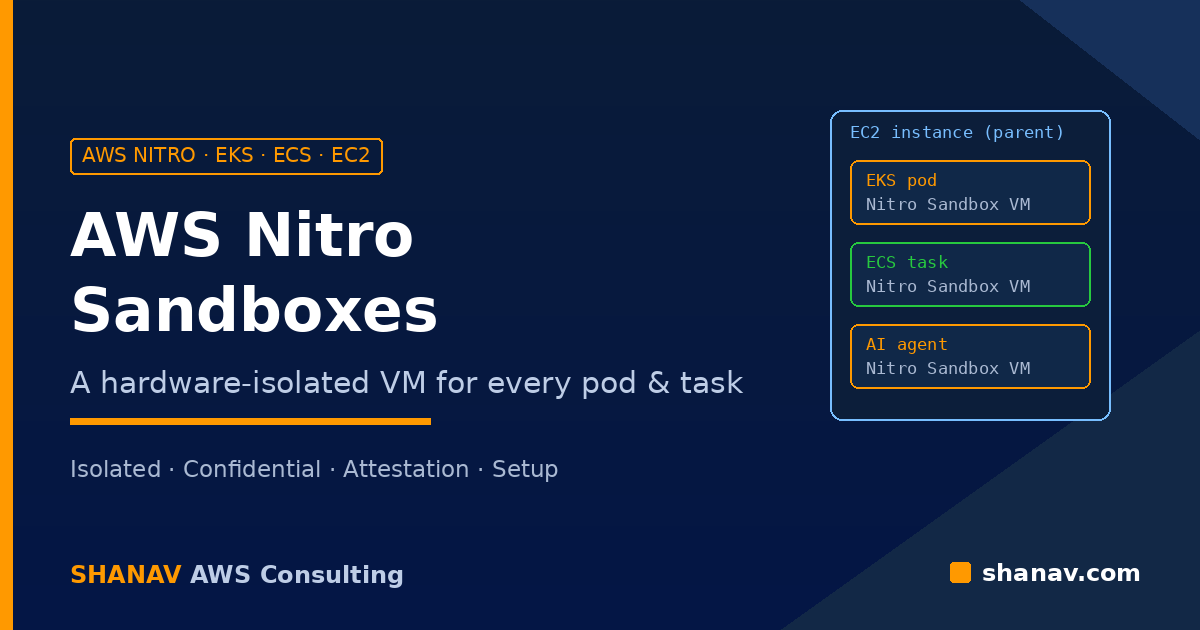
On 9 November 2026, AWS introduced AWS Nitro Sandboxes, lightweight virtual machines managed by the Nitro Hypervisor that give an Amazon EKS pod, an Amazon ECS task or a workload on EC2 its own hardware-isolated boundary. Turning it on in EKS or ECS is described by AWS as a one-line change, and it comes at no additional charge.
For anyone running multi-tenant SaaS, CI runners or AI agents that execute LLM-generated code, this matters. Containers on the same node have always shared one Linux kernel, so a single kernel weakness could expose every neighbour. This guide explains what Nitro Sandboxes are, how the isolated and confidential modes differ, and how to enable them on EKS, ECS and EC2.
What Are AWS Nitro Sandboxes?
According to the AWS Compute Blog launch post, a Nitro Sandbox is a lightweight VM that you launch and control from your EC2 instance. To the instance it behaves like a child VM, but it actually runs as a separate VM alongside it. The parent instance contributes vCPU, memory and I/O, while the Nitro System enforces separation between the sandbox and its parent, between sandboxes, and between the sandbox and AWS operators.
Because the sandbox is a first-level guest with no nested hypervisor, AWS says compute and memory run at near-native EC2 performance. It builds on the same isolation technology as Nitro Enclaves, with three changes for container workloads:
- Sandbox vCPUs can share cores with the parent instance through time slicing.
- The parent can attach standard virtio network and block devices, not only a vsock channel.
- You can run the sandbox through a standard virtual machine monitor such as Firecracker.
Where You Can Use Them
AWS lists support on every EC2 instance type that supports Nitro Enclaves, across general purpose, compute optimized, memory optimized, storage optimized and accelerated families, on Graviton, Intel and AMD processors, in commercial Regions worldwide. Storage works as it does for an instance (instance store, EBS, S3 and EFS), and networking stays native: pods keep VPC IPs through the VPC CNI, and ECS tasks get their own elastic network interface in awsvpc mode. Security groups and network policies are enforced on the parent, outside the sandbox, so a compromised workload cannot switch them off.
Isolated vs Confidential Sandbox Modes
EKS and ECS offer two modes on top of Nitro Sandboxes:
- Isolated sandbox: each pod or task gets its own hardware-isolated VM and kernel, protecting the node and neighbouring workloads. The node and its operators are still trusted, just as they are today.
- Confidential sandbox: fully attestable. Runtime operations are gated by a Cedar policy, images are verified inside the sandbox, and AWS KMS releases secrets only to workloads that prove they run the code you approved. AWS recommends this mode for anything that handles secrets, including protection from your own operators.
The EKS sandboxing documentation adds an important warning: without a KMS key policy that checks the attestation PCR values, the measurement is recorded but never verified. AWS tells you to always configure kms:RecipientAttestation:PCR17 (policy hash) and kms:RecipientAttestation:PCR8:ServiceName (system image signer) conditions on keys that protect confidential data.
How to Enable Nitro Sandboxes on Amazon EKS
Isolated and confidential pods require Kubernetes 1.36 or later and run in all commercial Regions. AWS recommends EKS Auto Mode, which needs no custom AMI or RuntimeClass setup. You opt in per pod:
apiVersion: v1
kind: Pod
metadata:
  name: my-app
spec:
  runtimeClassName: isolated-sandbox
  containers:
  - name: main
    image: public.ecr.aws/amazonlinux/amazonlinux:2023
    command: ["sleep", "3600"]
Use confidential-sandbox instead when you need attestation. Pods without a runtime class keep the default container runtime, so you can adopt the feature workload by workload. If you create the cluster with eksctl, pass --version explicitly, because AWS notes that eksctl uses an older default version.
On managed or self-managed node groups, you build a custom AMI with the Nitro Sandbox runtime, use a supported instance type, and launch nodes with EnclaveOptions.Enabled=true in the launch template. AWS is clear that choosing an Enclaves-capable instance type is not enough on its own: without that flag, the node never advertises sandbox capacity.
Blocking Network Access for Untrusted Code
For generated code that must not talk to the network, set the pod annotation sandbox.amazonaws.com/network-isolated: "true". The sandbox then boots with no network device at all, so there is no DNS, IMDS or Pod Identity. HTTP and TCP probes will fail, so switch to exec probes. AWS notes this is not absolute isolation, because the vsock channel can still reach guest-bound ports.
How to Enable Nitro Sandboxes on Amazon ECS
On ECS, the feature is part of ECS Managed Instances only. The ECS getting started guide lists the steps:
- In the capacity provider’s
InstanceLaunchTemplate, setnitroEnclavesEnabledtotrue(the default is false). It cannot be combined with local storage. - In the task definition, add
trustedExecutionConfigurationwithisolationModeset toISOLATED_SANDBOXorCONFIDENTIAL_SANDBOX. - Use the
awsvpcnetwork mode; host networking is not supported. - For confidential tasks, supply a base64
attestationPolicygenerated with theecs-nitro-sandbox-genpolicytool, plus a KMS key whose policy requires attestation.
ECS then launches compatible instances with a configured Bottlerocket image and no application code changes. Each task reports its mode in a read-only trustedExecutionSummary field, and load balancers, per-task security groups, VPC Flow Logs and VPC Lattice keep working.
Running Nitro Sandboxes Directly on EC2
If you build your own platform, you can launch sandboxes directly on nearly any Nitro-based instance with your own AMI, orchestration and VMM. Amazon Linux and Firecracker are natively supported today, and AWS says it has started to upstream support to Linux and other VMMs. A “Direct Mode” disables attestation but lets the parent access sandbox memory, which early adopters use to run operating systems such as Windows or Android in sandboxes.
Practical Use Cases and Tips
- AI agents: run each agent session in its own sandbox, so code triggered by a prompt injection stays in one VM that is deleted when the session ends.
- SaaS multi-tenancy: place tenants on shared nodes, each in its own sandbox, instead of giving each tenant a dedicated instance.
- CI/CD: run privileged builds and untrusted pull request code in a per-job VM.
- Size carefully: sandbox vCPUs are time-shared and can oversubscribe a node, so isolation is a security boundary, not a performance reservation.
- Know the cost: there is no extra charge for Nitro Sandboxes; you pay for EC2 plus the usual EKS Auto Mode or ECS Managed Instances fee.
Designing secure multi-tenant clusters is part of our AWS security services, and our cloud DevOps services cover hardening EKS and ECS pipelines and runners.
FAQ
Do Nitro Sandboxes cost extra?
No. AWS says Nitro Sandboxes and the EKS and ECS integrations are available at no additional charge. You pay for the underlying EC2 instances and any EKS Auto Mode or ECS Managed Instances management fee.
Can I use Nitro Sandboxes with AWS Fargate?
No. On ECS, isolated and confidential tasks are supported only on ECS Managed Instances, not on the EC2 or Fargate launch types.
What Kubernetes version do I need on EKS?
Kubernetes 1.36 or later. EKS Auto Mode is the recommended path because it handles instance selection and sandbox setup for you.
When should I choose confidential over isolated mode?
Choose confidential mode when a workload handles secrets or must be protected from cluster and node operators. Isolated mode is enough when you trust the node but want to contain untrusted code.
Bring VM-Grade Isolation to Your Containers
Nitro Sandboxes close one of the oldest gaps in container security, the shared kernel, without forcing you onto dedicated instances. The real work is in choosing the right mode, writing Cedar and KMS policies, and sizing nodes. If you want help planning a rollout on EKS or ECS, talk to the Shanav team.